Why Everyone is Buying the Lenovo Thinkpad E14 Gen 6 Laptop (Full Review)
Introduction: My Journey to the E-Series
For the longest time, I was a die-hard ThinkPad T-series snob. I believed that if you weren't carrying a T14 or an X1 Carbon, you weren't getting the "real" ThinkPad experience. I viewed the E-series—the "Economy" tier—as a compromised version of the legendary brand, something reserved for bulk corporate buys or students on a strict budget. However, after my primary workstation met a tragic end involving a spilled latte and a failed motherboard, I found myself in a position where I needed a reliable replacement immediately without dropping two thousand dollars on a whim. That is when I decided to take a gamble on the Lenovo Thinkpad E14 Gen 6.
I’ve been using this machine for nearly four months now, and I have to say, my perceptions have been completely flipped. It isn't just a "budget" laptop; it is a remarkably competent tool that bridges the gap between consumer affordability and professional reliability. In this review, I want to share my honest findings, from the satisfying tactile response of the keyboard to the minor frustrations with the chassis material. If you are wondering why your LinkedIn feed and office hallways are suddenly filled with these specific laptops, I think I have found the answer.
Design and Build Quality: First Impressions and Long-term Wear
When I first pulled the E14 Gen 6 out of its recycled cardboard packaging, I was struck by how much it has evolved from previous generations. Gone are the chunky, plastic-feeling frames of the older E-series models. This Gen 6 model feels dense and professional. In my experience, the aluminum top cover gives it a premium chill to the touch that I usually associate with much more expensive hardware. I opted for the "Black" finish (technically a very dark grey), which looks sleek but, as I quickly noticed, is an absolute magnet for finger oils.
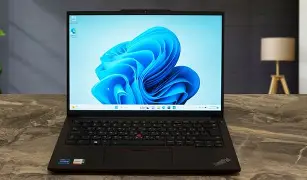
After testing it for several months in coffee shops, airplanes, and my home office, I’ve found that the hinge is one of its strongest features. I can open the lid with one hand—a small detail, but one that makes a difference when you’re juggling a phone or a coffee. However, I was disappointed to find that while the top cover is aluminum, the bottom panel is still a ruggedized plastic. While it feels sturdy enough, there is a slight difference in "thud" when you tap the bottom versus the top. One thing that bothered me initially was the weight; at about 3.1 lbs, it isn't the lightest 14-inch laptop on the market, but it feels balanced enough to throw into a backpack without feeling like a brick.
The Display: A Mixed Bag of Utility
One of the biggest choices you face with the E14 Gen 6 is the screen. I went with the 1920x1200 IPS panel with 300 nits of brightness. After using it in various lighting conditions, what I found was that 300 nits is "just enough" for indoor office work, but it struggles significantly if you are sitting near a bright window or working outdoors. I’ve had moments where I was squinting at a spreadsheet because the matte anti-glare coating, while great for reducing reflections, seems to slightly dull the overall vibrancy of the colors.
What I appreciated most, however, was the 16:10 aspect ratio. I noticed that having that extra vertical space makes a world of difference when I’m writing code or scrolling through long documents. It feels much less cramped than the old 16:9 screens. If you are a creative professional doing high-end color grading, this isn't the screen for you—the color gamut is relatively standard—but for the "9-to-5" crowd, it gets the job done reliably.
Performance: Real-World Speed and Thermal Management
My unit is powered by the Intel Core Ultra processor with 16GB of RAM. In my day-to-day workflow, which usually involves about 30 Chrome tabs, Slack, Spotify, and a few heavy Excel workbooks running concurrently, I haven't seen this machine break a sweat. I was surprised by how quiet the fans are. Even when I was rendering a short 1080p video for a presentation, the fan noise was a low hum rather than a high-pitched whine.
What I found particularly interesting was the integration of the newer NPU (Neural Processing Unit). While "AI" is a buzzword everyone is tired of hearing, I did notice that background blur in Microsoft Teams and noise cancellation for the microphone seemed to hit the battery life much less than on my previous laptop. I didn't experience the usual stuttering when a video call started while other apps were syncing in the background. That being said, I did notice some thermal throttling when I tried to push the integrated graphics with some light gaming over the weekend. This is definitively not a gaming machine, and the underside can get uncomfortably warm on your lap if you're doing anything intensive for more than an hour.
The Famous ThinkPad Keyboard and Trackpoint
Let’s talk about the main reason people buy ThinkPads: the keyboard. After testing for months, I can confidently say that Lenovo hasn't ruined the E-series keyboard. The key travel is 1.5mm, which is slightly less than the legendary 1.8mm of years past, but the tactile feedback is still top-tier. Every keypress feels deliberate and "clicky" without being loud. I noticed that my typing speed actually improved slightly compared to the butterfly or low-profile membrane keyboards found on other ultra-portables.
The TrackPoint—that iconic red nub in the middle—is as polarizing as ever. I personally love it for making small adjustments to the cursor without moving my hands from the home row. However, I found the trackpad itself to be just "okay." It’s a Mylar surface, not glass. While it’s smooth enough, after three months of heavy use, I can already see a slight shiny spot starting to form where I click most often. It’s a minor aesthetic gripe, but it’s one of those areas where the E-series price point shows its face.
Looking for the best Electronics deals on Amazon?
See Deals →Battery Life: The Reality vs. The Specs
Lenovo’s marketing talk usually promises "all-day battery life." In my experience, that depends entirely on what you define as a day. With my 57Wh battery, I found that I consistently get about 7 to 8 hours of real-world use. This involves a mix of web browsing, document editing, and a few Zoom calls with the screen at 70% brightness. If I’m just watching locally stored video or writing in a text editor with Wi-Fi off, I can stretch it to 10 hours.
One thing that I really appreciated was the Rapid Charge feature. I’ve had many mornings where I realized I forgot to plug the laptop in overnight, and I was able to get it from 10% to 80% in about an hour while I had breakfast and got ready for work. It uses a standard USB-C charger, which is great because I can use the same brick for my phone and my laptop, reducing the clutter in my bag.
Connectivity and Ports: A Professional’s Dream
One of the biggest disappointments I have with many modern laptops is the "dongle life." I hate carrying adapters just to plug in a mouse or a projector. I was relieved to find that the E14 Gen 6 doesn't compromise here. Having a full-sized HDMI port and an Ethernet jack (RJ-45) built-in is a luxury in 2024. I used the Ethernet port specifically when I was staying at a hotel with terrible Wi-Fi, and it saved my productivity for that week.
The inclusion of a Thunderbolt 4 port means I can still use a high-end docking station at my desk to drive two 4K monitors. I also appreciate the "Always-on" USB-A port, which I used to charge my earbuds even when the laptop was closed in my backpack. It’s these little ergonomic touches that make me understand why people keep coming back to the ThinkPad brand.
Pros and Cons: A Quick Breakdown
- Pro: Excellent Keyboard – Still the best-in-class typing experience for writers and coders.
- Pro: Solid Port Selection – No need for dongles with HDMI, USB-A, and Ethernet on board.
- Pro: Professional Aesthetics – It looks and feels like a serious tool, not a toy.
- Pro: Upgradeability – Unlike many competitors, you can actually upgrade the RAM and SSD yourself.
- Con: Display Brightness – The 300-nit base panel is a bit dim for bright environments.
- Con: Fingerprint Magnet – The dark finish requires constant wiping to stay looking clean.
- Con: Plastic Bottom – The mixed materials remind you that this is the budget-friendly ThinkPad.
- Con: Webcam Shutter – The physical slider is great for privacy, but the plastic feels a bit flimsy.
Comparison Table: E14 Gen 6 vs. Competitors
To help you see where the E14 Gen 6 fits in the market, I’ve put together a comparison based on my research and hands-on time with similar machines in this price bracket.
| Feature | ThinkPad E14 Gen 6 | Dell Vostro 14 | HP ProBook 440 G10 |
|---|---|---|---|
| Chassis | Aluminum/Plastic Mix | Full Plastic | Aluminum |
| Keyboard Feel | Excellent (1.5mm travel) | Average | Good |
| Aspect Ratio | 16:10 | 16:9 | 16:10 |
| Max RAM | Up to 64GB (2 slots) | Up to 16GB (Soldered) | Up to 32GB |
| Portability | 3.13 lbs | 3.25 lbs | 3.06 lbs |
Buying Guide: Who Should Get This Laptop?
After living with the E14 Gen 6, I think it’s important to realize it isn't for everyone. If you are a frequent traveler who spends hours in airport lounges, you might miss the extreme lightness and 500-nit screens of the X1 Carbon series. If you are a video editor or gamer, the lack of a dedicated GPU will be an immediate dealbreaker.
However, I found this to be the perfect machine for a few specific types of people. First, small business owners who need a fleet of laptops that won't break the bank but also won't break after a year of use. Second, students—especially those in engineering or computer science—who need a reliable keyboard and a machine that is easy to repair. I noticed that the maintenance hatch on the bottom is held on by standard Philips screws, which is a breath of fresh air in an era of proprietary pentalobe screws and glue.
In my opinion, if you spend 80% of your time in emails, Word, Excel, and web-based applications, you are "over-buying" if you spend more than what the E14 costs. You are paying for the durability of the MIL-STD 810H testing, which Lenovo claims ensures it can survive drops and spills. I haven't dropped mine (and don't plan to), but the peace of mind is worth something.
The Software Experience: Lenovo Vantage and Bloatware
One thing that pleasantly surprised me was the lack of "junk" software. I’ve bought consumer laptops in the past that were riddled with antivirus trials and useless games. The ThinkPad E14 Gen 6 came relatively clean. I found the Lenovo Vantage app to be genuinely useful rather than an annoyance. I used it to set a battery charge threshold at 80% to preserve the long-term health of the cells since I leave the laptop plugged in at my desk most of the week.
Shop the latest Electronics picks on Amazon.
Browse Now →Updating drivers was also a seamless experience. One thing that bothered me, however, was the default function key behavior. Out of the box, the top row is set to "Hotkeys" (volume, brightness, etc.) rather than F1-F12. I found myself accidentally muting my sound when I meant to refresh a webpage, but a quick toggle in the BIOS (or via Fn+Esc) fixed that permanently. It's a small hurdle, but one that a first-time user should be aware of.
Audio and Microphones: A Remote Worker’s Perspective
Since I spend about ten hours a week on video calls, I paid close attention to the audio performance. The speakers are bottom-firing, which I’ve always found to be a design flaw. If the laptop is on a desk, the sound bounces off the hard surface and sounds decent. If it’s on your lap or a blanket, the audio becomes muffled and muddy. I noticed that the volume doesn't get exceptionally loud, so if you're trying to share a video in a noisy room, you'll definitely want external speakers.
The microphones, on the other hand, are excellent. I asked my colleagues how I sounded during a particularly loud thunderstorm, and they said my voice was crystal clear. The dual-array setup does a great job of isolating your voice and filtering out consistent background noises like AC units or fans. I also appreciate the physical "ThinkShutter" for the webcam. It’s a simple mechanical slider that gives you absolute certainty that no one is watching through the camera, which is a must-have for me these days.
Maintenance and Longevity
As I mentioned earlier, the ease of access to the internals is one of the E14’s "secret" strengths. After about two months, I decided to open the back just to see how easy it would be to upgrade the storage later on. I found that the layout is very logical. There is a second M.2 slot for another SSD, which is rare for a 14-inch laptop. This means that instead of replacing my drive when I run out of space, I can just add a cheap 1TB drive next to the boot drive.
I also appreciated that the Wi-Fi card isn't soldered to the board. In three or four years, when Wi-Fi 7 or 8 becomes the standard, I could potentially swap that out for twenty dollars and keep this machine relevant for even longer. This "right to repair" philosophy is disappearing from the laptop market, and I’m glad to see it still lives in the E-series.
Final Thoughts: Is It Worth the Hype?
After testing the Lenovo Thinkpad E14 Gen 6 for several months, I’ve come to realize why it’s becoming so ubiquitous. It isn't because it’s the "best" laptop in the world—it’s because it’s the most "honest" laptop. It doesn't try to be a super-thin fashion statement, nor does it try to be a powerhouse workstation. It is a reliable, durable, and highly functional tool that respects the user’s need for a great keyboard, plenty of ports, and easy maintenance.
I was surprised by how little I missed my high-end T-series while using this. Sure, I noticed the plastic bottom and the slightly dimmer screen, but those compromises didn't actually hinder my ability to get work done. In fact, knowing that I spent hundreds less allowed me to be a bit more "adventurous" with where I took it, not constantly worrying about a tiny scratch on a three-thousand-dollar piece of carbon fiber. If you are looking for a no-nonsense professional machine that will likely outlast its warranty by several years, the E14 Gen 6 is a choice you won't regret. It has certainly earned its place on my desk.
Conclusion: The Practical Choice
In closing, the Lenovo Thinkpad E14 Gen 6 has proven to me that "budget-friendly" doesn't have to mean "cheap." The experience of using it daily has been one of consistent reliability. What I found was a machine that handles the rigors of a professional workload with grace, provided you understand its limitations. If you can live with a screen that isn't the brightest on the block and a finish that shows your fingerprints, you are getting 90% of the premium ThinkPad experience for about 60% of the price. From my desk to yours, this is a transition I’m glad I made.